While it might seem odd for an English education company to introduce a translator, it’s essential for accelerating work progress. Translators also require someone knowledgeable in the language to catch errors and use them correctly. (영어교육 회사에서 번역기 사용 소개라면 이상하게 보일 수 있겠지만 업무 추진 속도를 위해서 번역기는 필수이고, 번역기도 그 언어를 아는 사람이 오류를 잡아내고 제대로 쓸 수 있습니다.)
1. How to Install DeepL (DeepL 설치하는 방법)
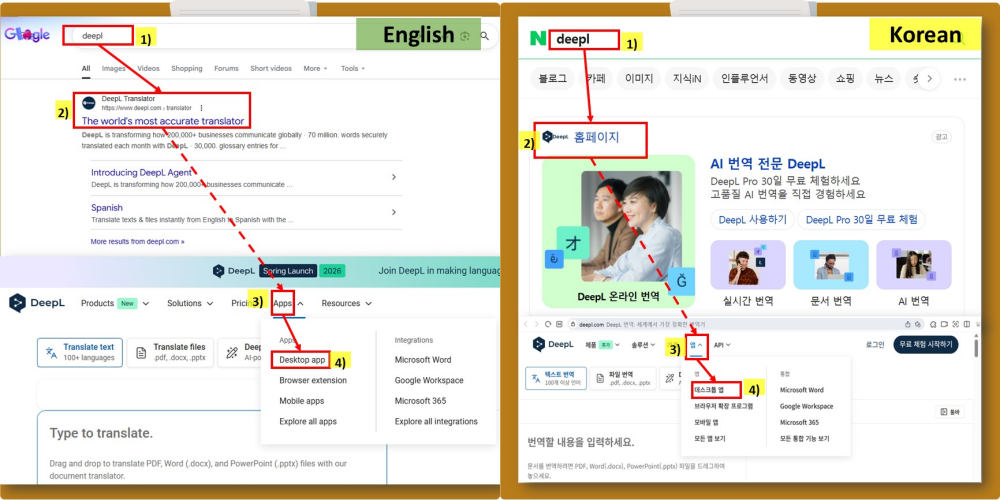
1) Type ‘deepl’ into the search bar on a portal site! (포털 사이트 검색창에 ‘deepl’을 입력!)
2) Click ‘DeepL Translator’ homepage that appears at the top! (제일 상단에 나오는 DeepL 홈페이지 클릭!)
3) Select the ‘Apps ^’ menu at the top of the DeepL homepage! (DeepL 홈페이지 상단의 ‘앱 ^’ 메뉴 선택!)
4) Choose [Desktop App] from the app menu! (If you want to install it on your smartphone, select [Mobile App].) (앱 메뉴 하위 [데스크톱 앱] 선택! (만약에 스마트폰에 설치하고 싶으시면 [모바일 앱]을 선택하시면 됩니다.)
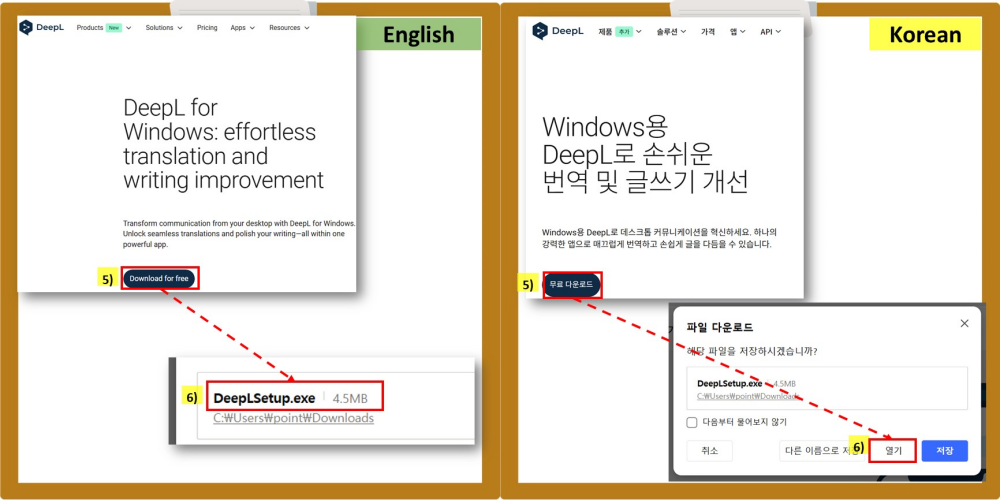
5) Click [Download for free]! ([무료 다운로드] 클릭!)
6) Run the DeepLSetup.exe file! – You may need to [Save As] it to your computer first and then open it. (DeepLSetup.exe 파일 실행! – 필요 시 내 컴퓨터에 [다른 이름으로 저장] 후 열어야 할 수도 있음.)
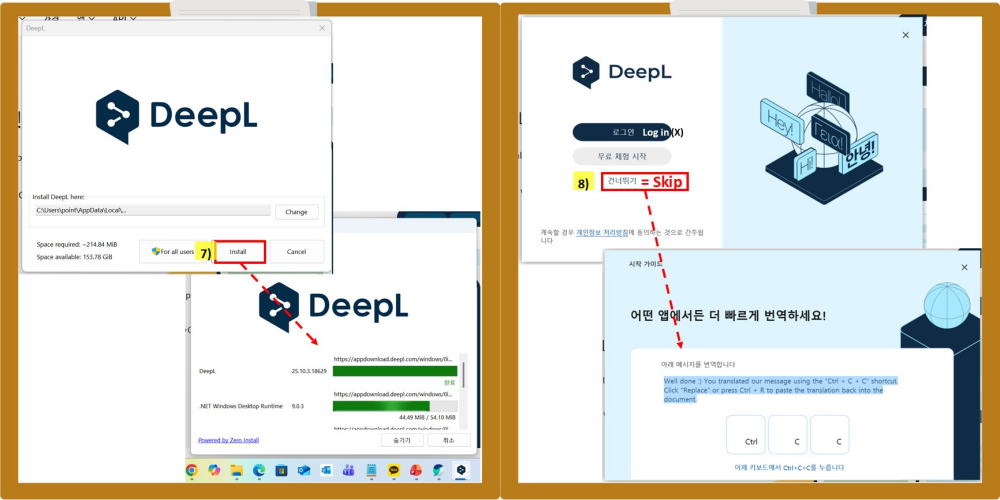
7) Click [Install]! – This may take a while. ([설치] 클릭! – 시간이 좀 소요됩니다.)
8) Once installation is complete, do not select [Login] or [Start Free Trial] – just click [Skip]! (설치가 완료되면 [로그인], [무료 체험 시작]을 선택하지 말고 그냥 [건너뛰기] 클릭!)
9) If you see the Start Guide, installation is complete! (시작 가이드가 보이면 설치 완료!)
[Desktop App] Direct download link. (앱 메뉴 하위 [데스크톱 앱] 다운로드 바로가기 링크.)
https://www.deepl.com/en/windows-app
…
2. How to Use DeepL (딥엘 사용법)
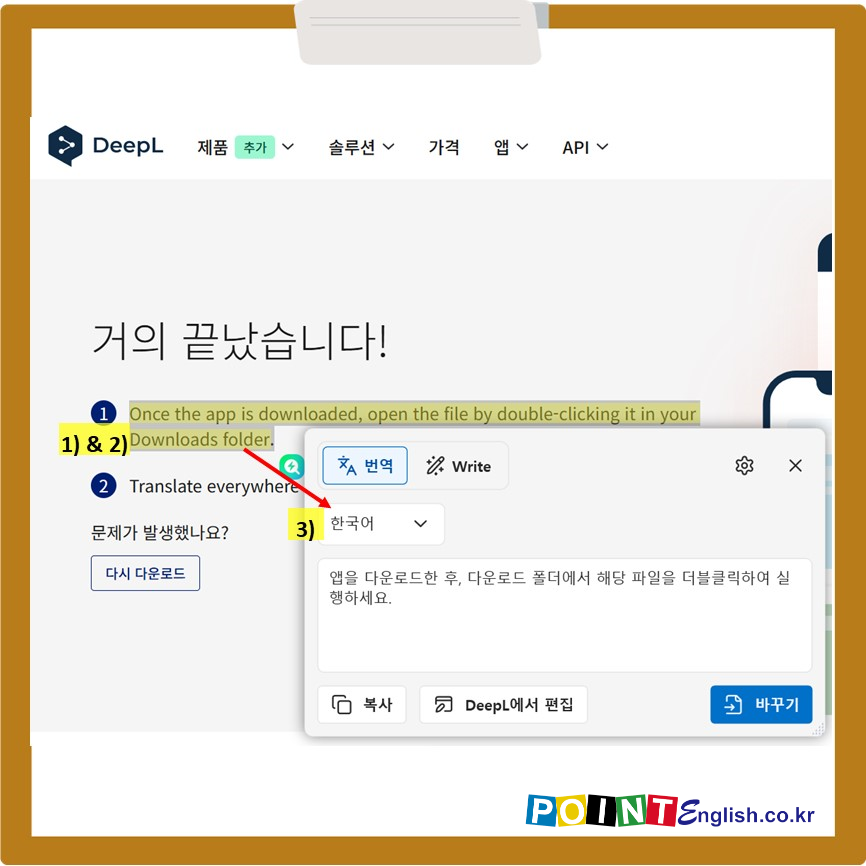
1) Drag to select the entire text you want translated, regardless of the program—KakaoTalk, Teams, webpages, MS Office, etc.! (카톡, 팀즈, 웹페이지, MS 오피스 어느 프로그램이든 상관없이 번역을 원하는 글을 시작부터 끝까지 드래그하여 선택!)
2) Hold down the [Ctrl] key and quickly press the [c] key twice in succession! ([Ctr’l] 키를 누른 상태에서 [c] 키보드를 빠르게 연달아 두 번 클릭!) 3) Occasionally, you may need to switch the language to [Korean]. However, once changed, it remains set. (간혹 [한국어]로 언어를 바꿔야 할 경우도 있습니다. 하지만 한 번 바꾸면 계속 유지됩니다.)
#포인트영어 #딥엘설치 #DeepL설치 #DeepL사용법
↓↓↓ 국내 최저가 수준의 포인트영어 수강료 확인하고, 무료 레벨테스트 신청하기 ↓↓↓